728x90
2026.06.16 - [운동하는 개발자/Flutter] - 13년차 응용프로그래머, Gemini에게 Flutter 배우기 - 8 libserialport (1)
위 1편에 이어서
import 'package:flutter/material.dart';
import 'package:provider/provider.dart';
import 'providers/kiosk_provider.dart';
import 'providers/SerialProvider.dart';

void main() {
  runApp(
    MultiProvider(
      providers: [
        ChangeNotifierProvider(create: (context) => KioskProvider()),
        ChangeNotifierProvider(create: (context) => SerialProvider()),
      ],
      child: const MyApp(),
    ),
  );
}

class MyApp extends StatelessWidget {
  const MyApp({super.key});

  @override
  Widget build(BuildContext context) {
    return const MaterialApp(
      debugShowCheckedModeBanner: false,
      home: KioskMainPage(),
    );
  }
}

// =======================================================================
// [메인 레이아웃] 화면을 좌측(메뉴)과 우측(장바구니)으로 분할합니다.
// =======================================================================
class KioskMainPage extends StatelessWidget {
  const KioskMainPage({super.key});

  @override
  Widget build(BuildContext context) {
    return Scaffold(
      appBar: AppBar(
        title: const Text('커피 키오스크 (MVVM)'),
        backgroundColor: Colors.brown,
      ),
      body: Column(
        children: [
          // 💡 [신규 View] 상단 하드웨어 제어 바
          const PrinterControlBar(),
          const Divider(height: 1, thickness: 1),
          // 좌측 영역 (비율 2) : 카테고리 탭 + 상품 그리드
          Expanded(
            child: Row(
              children: [
                Expanded(
                  flex: 2,
                  child: Column(
                    children: const [
                      CategorySelectionView(), // View 1
                      Expanded(child: ProductGridView()), // View 2
                    ],
                  ),
                ),
                // 구분선
                const VerticalDivider(width: 1, thickness: 1),

                // 우측 영역 (비율 1) : 장바구니 리스트 + 결제 바
                Expanded(
                  flex: 1,
                  child: Column(
                    children: const [
                      Expanded(child: CartListView()), // View 3
                      PaymentView(), // View 4
                    ],
                  ),
                ),
              ],
            ),
          ),
        ],
      ),
    );
  }
}

// =======================================================================
// [신규 View] 상단 프린터 제어 영역
// =======================================================================
class PrinterControlBar extends StatefulWidget {
  const PrinterControlBar({super.key});

  @override
  State<PrinterControlBar> createState() => _PrinterControlBarState();
}

class _PrinterControlBarState extends State<PrinterControlBar> {
  String? _selectedPort; // 콤보박스 선택 상태 보관용

  @override
  Widget build(BuildContext context) {
    // SerialProvider의 상태 구독
    final serialProvider = context.watch<SerialProvider>();
    final ports = serialProvider.availablePorts;
    final isOpen = serialProvider.isOpen;

    return Container(
      color: Colors.grey[200],
      padding: const EdgeInsets.symmetric(horizontal: 16.0, vertical: 8.0),
      child: Row(
        children: [
          const Icon(Icons.print, color: Colors.black54),
          const SizedBox(width: 8),
          const Text('영수증 프린터:', style: TextStyle(fontWeight: FontWeight.bold)),
          const SizedBox(width: 16),

          // 포트 검색 버튼
          ElevatedButton.icon(
            onPressed: () => context.read<SerialProvider>().scanPorts(),
            icon: const Icon(Icons.search, size: 18),
            label: const Text('포트 검색'),
          ),
          const SizedBox(width: 16),

          // 포트 목록 콤보박스 (Dropdown)
          DropdownButton<String>(
            hint: const Text('포트 선택'),
            value: _selectedPort,
            items: ports.map((port) {
              return DropdownMenuItem(value: port, child: Text(port));
            }).toList(),
            onChanged: isOpen
                ? null
                : (value) {
                    setState(() => _selectedPort = value);
                  },
          ),
          const SizedBox(width: 16),

          // 연결/해제 토글 버튼
          ElevatedButton(
            style: ElevatedButton.styleFrom(
              backgroundColor: isOpen ? Colors.red : Colors.green,
            ),
            onPressed: _selectedPort == null
                ? null
                : () {
                    if (isOpen) {
                      context.read<SerialProvider>().disconnect();
                    } else {
                      context.read<SerialProvider>().connect(_selectedPort!);
                    }
                  },
            child: Text(
              isOpen ? '연결 해제' : '연결하기',
              style: const TextStyle(color: Colors.white),
            ),
          ),
          const Spacer(),

          // 연결 상태 인디케이터
          CircleAvatar(
            radius: 8,
            backgroundColor: isOpen ? Colors.green : Colors.red,
          ),
          const SizedBox(width: 8),
          Text(
            isOpen ? '통신 중' : '연결 끊김',
            style: TextStyle(color: isOpen ? Colors.green : Colors.red),
          ),
        ],
      ),
    );
  }
}

// =======================================================================
// [View 1] 카테고리 탭 영역
// =======================================================================
class CategorySelectionView extends StatelessWidget {
  const CategorySelectionView({super.key});

  @override
  Widget build(BuildContext context) {
    // 1. 현재 선택된 카테고리 상태만 구독 (UI 갱신용)
    final selectedCategory = context.watch<KioskProvider>().selectedCategory;
    final categories = ['커피', '음료', '디저트'];

    return Container(
      color: Colors.grey[200],
      padding: const EdgeInsets.all(8.0),
      child: Row(
        mainAxisAlignment: MainAxisAlignment.spaceAround,
        children: categories.map((category) {
          final isSelected = selectedCategory == category;
          return ElevatedButton(
            style: ElevatedButton.styleFrom(
              backgroundColor: isSelected ? Colors.brown : Colors.grey,
            ),
            // 2. 클릭 시 ViewModel의 함수 호출 (데이터 변경 요청)
            onPressed: () =>
                context.read<KioskProvider>().changeCategory(category),
            child: Text(category, style: const TextStyle(color: Colors.white)),
          );
        }).toList(),
      ),
    );
  }
}

// =======================================================================
// [View 2] 상품 4x4 그리드 영역
// =======================================================================
class ProductGridView extends StatelessWidget {
  const ProductGridView({super.key});

  @override
  Widget build(BuildContext context) {
    // 1. ViewModel에서 현재 카테고리에 맞는 상품 목록을 가져옴
    final products = context.watch<KioskProvider>().products;

    return GridView.builder(
      padding: const EdgeInsets.all(16.0),
      // 4열(4x4) 그리드 설정
      gridDelegate: const SliverGridDelegateWithFixedCrossAxisCount(
        crossAxisCount: 4,
        crossAxisSpacing: 10,
        mainAxisSpacing: 10,
      ),
      itemCount: products.length,
      itemBuilder: (context, index) {
        final product = products[index];
        return InkWell(
          // 2. 상품 클릭 시 장바구니 추가 함수 호출
          onTap: () => context.read<KioskProvider>().addToCart(product),
          child: Card(
            elevation: 3,
            child: Column(
              mainAxisAlignment: MainAxisAlignment.center,
              children: [
                Icon(Icons.local_cafe, size: 40, color: Colors.brown[300]),
                const SizedBox(height: 10),
                Text(
                  product.name,
                  style: const TextStyle(fontWeight: FontWeight.bold),
                ),
                Text(
                  '${product.price}원',
                  style: const TextStyle(color: Colors.blue),
                ),
              ],
            ),
          ),
        );
      },
    );
  }
}

// =======================================================================
// [View 3] 장바구니 리스트 영역
// =======================================================================
class CartListView extends StatelessWidget {
  const CartListView({super.key});

  @override
  Widget build(BuildContext context) {
    // 1. 장바구니 목록 상태 구독
    final cartItems = context.watch<KioskProvider>().cartItems;

    if (cartItems.isEmpty) {
      return const Center(child: Text('장바구니가 비어 있습니다.'));
    }

    return ListView.builder(
      itemCount: cartItems.length,
      itemBuilder: (context, index) {
        final item = cartItems[index];
        return ListTile(
          title: Text(item.product.name),
          subtitle: Text('${item.product.price}원 x ${item.quantity}'),
          trailing: Row(
            mainAxisSize: MainAxisSize.min,
            children: [
              Text(
                '${item.totalItemPrice}원',
                style: const TextStyle(fontWeight: FontWeight.bold),
              ),
              IconButton(
                onPressed: () {
                  context.read<KioskProvider>().removeFromCart(index);
                },
                icon: const Icon(Icons.delete),
              ),
            ],
          ),
        ); // ListTile 닫는 괄호 + 세미콜론
      },
    );
  }
}

// =======================================================================
// [View 4] 하단 결제 바 영역
// =======================================================================
class PaymentView extends StatelessWidget {
  const PaymentView({super.key});

  @override
  Widget build(BuildContext context) {
    // 1. 총 결제 금액 상태 구독
    final totalPrice = context.watch<KioskProvider>().totalPrice;

    return Container(
      color: Colors.brown[50],
      padding: const EdgeInsets.all(24.0),
      child: Column(
        children: [
          Row(
            mainAxisAlignment: MainAxisAlignment.spaceBetween,
            children: [
              const Text(
                '총 결제 금액:',
                style: TextStyle(fontSize: 20, fontWeight: FontWeight.bold),
              ),
              Text(
                '$totalPrice원',
                style: const TextStyle(
                  fontSize: 24,
                  color: Colors.redAccent,
                  fontWeight: FontWeight.bold,
                ),
              ),
            ],
          ),
          const SizedBox(height: 16),
          SizedBox(
            width: double.infinity,
            height: 60,
            child: ElevatedButton(
              style: ElevatedButton.styleFrom(backgroundColor: Colors.brown),
              // 2. 결제 완료 (장바구니 초기화) 함수 호출
              //onPressed: () => context.read<KioskProvider>().clearCart(),
              onPressed: () async {
                final kioskProvider = context.read<KioskProvider>();
                final serialProvider = context.read<SerialProvider>();

                // 1. KioskProvider는 결제만 하고, 영수증에 출력할 '순수 데이터'만 반환합니다.
                final receiptData = await kioskProvider.processPayment();

                if (!context.mounted) return;

                // 2. View가 중간에서 데이터를 받아 통신 프로바이더에게 배달합니다.
                if (receiptData != null) {
                  serialProvider.sendBytes(receiptData);
                  showDialog(
                    context: context,
                    builder: (context) => AlertDialog(
                      title: const Text('결제 성공'),
                      content: const Text('주문이 완료되었습니다.'),
                      actions: [
                        TextButton(
                          onPressed: () => Navigator.pop(context),
                          child: const Text('확인'),
                        ),
                      ],
                    ),
                  );
                }
              },
              child: const Text(
                '결제하기',
                style: TextStyle(fontSize: 20, color: Colors.white),
              ),
            ),
          ),
        ],
      ),
    );
  }
}
View 최종코드
중간에 코드를 수정하고 실행했는데 프로그램 실행은 되지 않고 출력에 아래와 메세지가 발생했다(에러도 안 뜸)
════════ Exception caught by rendering library ═════════════════════════════════

The following assertion was thrown during performLayout():

RenderFlex children have non-zero flex but incoming width constraints are unbounded.

When a row is in a parent that does not provide a finite width constraint, for example if it is in a horizontal scrollable, it will try to shrink-wrap its children along the horizontal axis. Setting a flex on a child (e.g. using Expanded) indicates that the child is to expand to fill the remaining space in the horizontal direction.

These two directives are mutually exclusive. If a parent is to shrink-wrap its child, the child cannot simultaneously expand to fit its parent.

Consider setting mainAxisSize to MainAxisSize.min and using FlexFit.loose fits for the flexible children (using Flexible rather than Expanded). This will allow the flexible children to size themselves to less than the infinite remaining space they would otherwise be forced to take, and then will cause the RenderFlex to shrink-wrap the children rather than expanding to fit the maximum constraints provided by the parent.

If this message did not help you determine the problem,
영어가 넘길어서 대충읽고 그냥 AI한테 물어봤는데
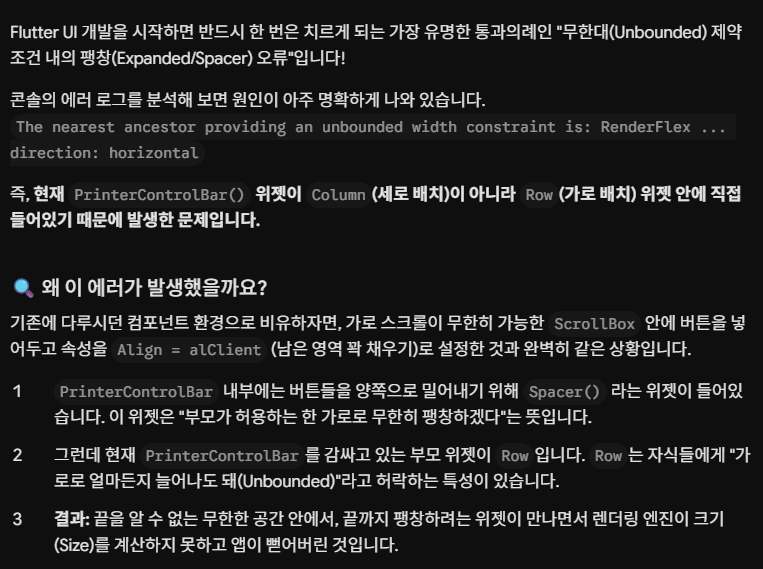
이거도 런타임 오류이기에 빌드에선 에러가 안뜬다는점!
이후 정상출력까지 확인
프린트 연동 스펙문서도 안줬는데 이렇게 만드는거도 신기...
아무리 보편적인 스펙이라지만
다음은 뭘해야하나
728x90
'운동하는 개발자 > Flutter' 카테고리의 다른 글
| 13년차 응용프로그래머, Gemini에게 Flutter 배우기 - 8 libserialport (1) (0) | 2026.06.16 |
|---|---|
| 13년차 응용프로그래머, Gemini에게 Flutter 배우기 - 7 MVVM (2) (0) | 2026.06.06 |
| 13년차 응용프로그래머, Gemini에게 Flutter 배우기 - 6 MVVM (1) (0) | 2026.06.03 |
| 13년차 응용프로그래머, Gemini에게 Flutter 배우기 - 5 SQLite (0) | 2026.05.31 |
| 13년차 응용프로그래머, Gemini에게 Flutter 배우기 - 4 RestAPI (0) | 2026.05.27 |


