728x90
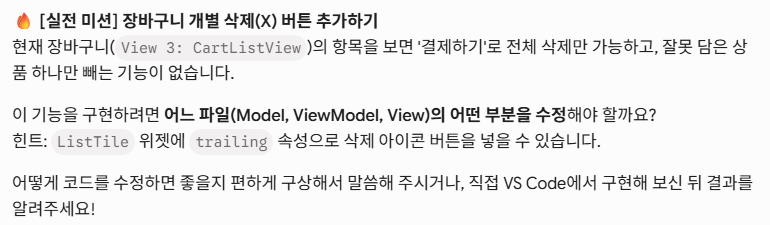
상품을 빼는 기능을 만들어 보라고 함
MFC에 쩔어버린 나는 ListView에서 바로 삭제할 방법에 대해서 검색해봄
removeAt 함수로 가능한걸 확인하고 코드를 생각없이 바로 작성했는데 에러가 뜸
The method 'setState' isn't defined for the type 'CartListView'.
Try correcting the name to the name of an existing method, or defining a method named 'setState'.
원인은 클래스가 StatelessWidget여서 그렇고 StatefulWidget로 바꿔줘야 가능하다고 함
근데 나는 MVVM패턴을 위해 다 StatelessWidget로 가게할껀데..?
이때 알아차림 View에서 데이터를 조작하려고 했던것을.. ㅠ
결제완료버튼을 보면 이런식으로 ViewModel의 함수를 호출해서 데이터를 수정하고 provider로 갱신을 수신하는 방식임을 다시 확인
onPressed: () => context.read<KioskProvider>().clearCart(),
기존에 ListTile에 trailing에는 금액을 표시하는 Text가 있으므로 Row로 공간을 나눈 뒤 Children으로 분할시켜주고
IconButton을 만들었고 Icons.delete 버튼 사용함(엑스를 예상했는데 세련된 휴지통모양이래서 놀람 ㅎ;)
class CartListView extends StatelessWidget {
  const CartListView({super.key});

  @override
  Widget build(BuildContext context) {
    // 1. 장바구니 목록 상태 구독
    final cartItems = context.watch<KioskProvider>().cartItems;

    if (cartItems.isEmpty) {
      return const Center(child: Text('장바구니가 비어 있습니다.'));
    }

    return ListView.builder(
      itemCount: cartItems.length,
      itemBuilder: (context, index) {
        final item = cartItems[index];
        return ListTile(
          title: Text(item.product.name),
          subtitle: Text('${item.product.price}원 x ${item.quantity}'),
          trailing: Row(
            mainAxisSize: MainAxisSize.min,
            children: [
              Text('${item.totalItemPrice}원', style: const TextStyle(fontWeight: FontWeight.bold)),
              IconButton(
                onPressed: () {
                  context.read<KioskProvider>().removeFromCart(index);
                },
                icon: const Icon(Icons.delete),
              ),
            ],
          ),
        );  // ListTile 닫는 괄호 + 세미콜론
      },
    );
  }
}
그리고 정상작동 확인
다음스탭으로 넘어가서 화면 알림을 어떻게 구성할지에 대해 진행함

가장 많이 사용하는 방법으로 알려달라고 했더니 주로 Future를 사용한다고 했음
나는 C++에서 Future와 promise에 대해 학습은 해봤지만 실무에서 실제 사용해본적은 없었으나 코드보니 Flutter도 거의 비슷했음
//Kiosk_provider.dart

Future<bool> processPayment() async {
    if (_cartItems.isEmpty) return false;

    try {
      // 1. 가상의 네트워크/DB 지연 시간 (예: 1초)
      await Future.delayed(const Duration(seconds: 1));

      // 2. 결제 완료 처리
      _cartItems.clear();
      notifyListeners();

      // 3. 뷰에게 성공했다고 결과만 툭 던져줍니다.
      return true;
    } catch (e) {
      return false; // 실패
    }
  }
//main.dart
class PaymentView extends StatelessWidget {
const PaymentView({super.key});
@override
Widget build(BuildContext context) {
// 1. 총 결제 금액 상태 구독
final totalPrice = context.watch<KioskProvider>().totalPrice;
return Container(
color: Colors.brown[50],
padding: const EdgeInsets.all(24.0),
child: Column(
children: [
Row(
mainAxisAlignment: MainAxisAlignment.spaceBetween,
children: [
const Text('총 결제 금액:', style: TextStyle(fontSize: 20, fontWeight: FontWeight.bold)),
Text('$totalPrice원', style: const TextStyle(fontSize: 24, color: Colors.redAccent, fontWeight: FontWeight.bold)),
],
),
const SizedBox(height: 16),
SizedBox(
width: double.infinity,
height: 60,
child: ElevatedButton(
style: ElevatedButton.styleFrom(backgroundColor: Colors.brown),
// 2. 결제 완료 (장바구니 초기화) 함수 호출
//onPressed: () => context.read<KioskProvider>().clearCart(), //여기 수정함
onPressed: () async{
final isSuccess = await context.read<KioskProvider>().processPayment();
if(!context.mounted) return; //provider에서 딜레이 처리 중 프로그램 종료 등 상황 체크 필수 놓치면 access violation
if(isSuccess){
showDialog(
context: context,
builder: (context) => AlertDialog(
title: const Text('결제 성공'),
content: const Text('주문이 완료되었습니다.'),
actions: [
TextButton(
onPressed: () => Navigator.pop(context),
child: const Text('확인'),
),
],
),
);
}
},
child: const Text('결제하기', style: TextStyle(fontSize: 20, color: Colors.white)),
),
),
],
),
);
}
}이후 정상동작 확인
728x90
'운동하는 개발자 > Flutter' 카테고리의 다른 글
| 13년차 응용프로그래머, Gemini에게 Flutter 배우기 - 8 libserialport (2) (0) | 2026.06.17 |
|---|---|
| 13년차 응용프로그래머, Gemini에게 Flutter 배우기 - 8 libserialport (1) (0) | 2026.06.16 |
| 13년차 응용프로그래머, Gemini에게 Flutter 배우기 - 6 MVVM (1) (0) | 2026.06.03 |
| 13년차 응용프로그래머, Gemini에게 Flutter 배우기 - 5 SQLite (0) | 2026.05.31 |
| 13년차 응용프로그래머, Gemini에게 Flutter 배우기 - 4 RestAPI (0) | 2026.05.27 |


